
What is Focus First?
Stop guessing what to work on next. Focus First sorts your Obsidian tasks into the Eisenhower matrix, by urgency (due date) and importance (priority), so the next right action is always obvious.
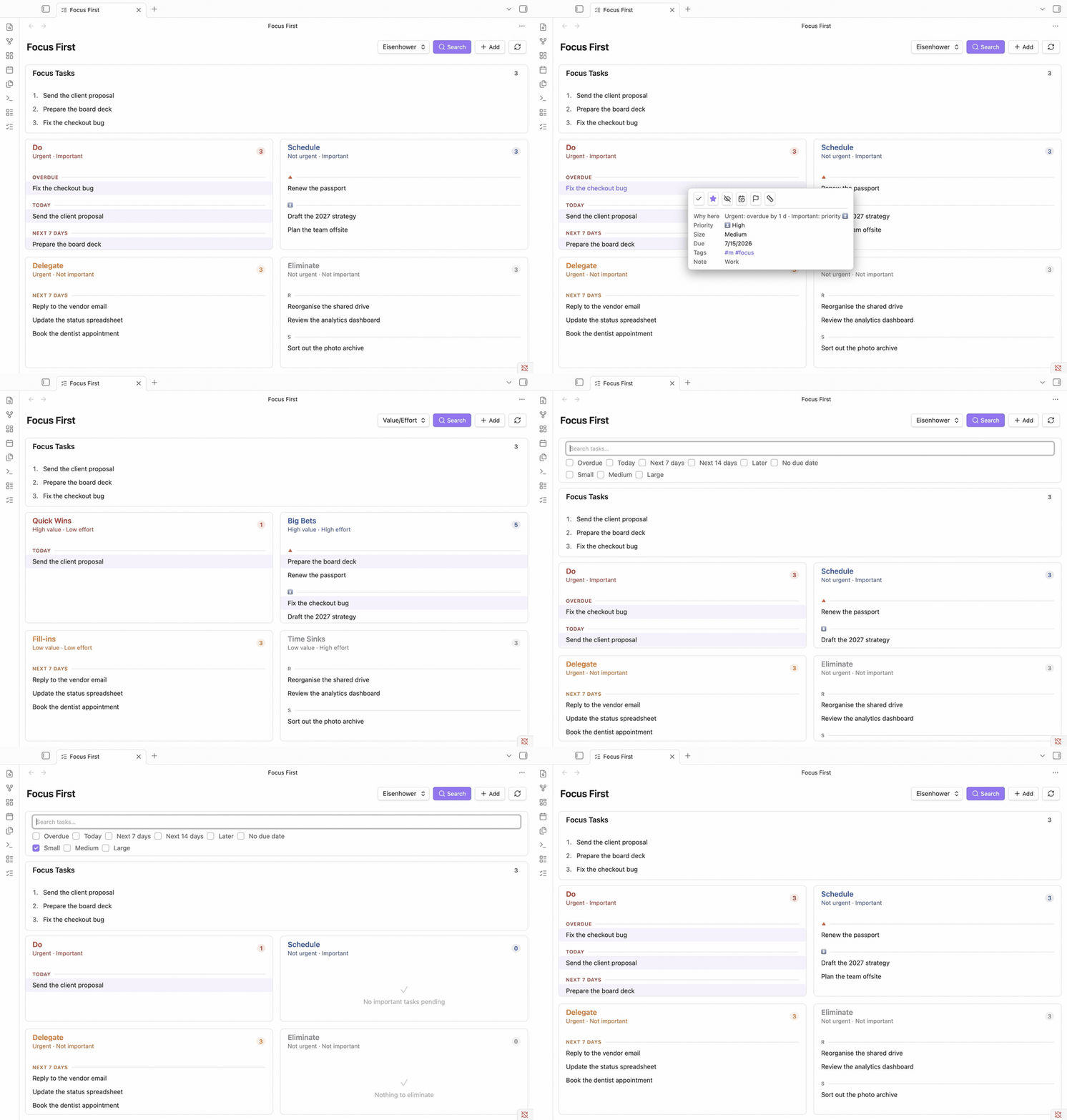
It reads standard checkbox tasks from your vault (compatible with the Tasks plugin format - due dates, priorities, tags) and places each one automatically:
| Urgent | Not urgent | |
|---|---|---|
| Important | Do - handle now | Schedule - plan for later |
| Not important | Delegate - hand off if possible | Eliminate - reconsider or drop |
No manual sorting needed - though you can still pin any task to a quadrant by hand.
Feature overview
Everything Focus First does, with links to where it's explained.
Classification & matrices
- Automatic classification into quadrants by urgency (due date) and importance (priority) - no setup beyond your existing tasks. → How tasks are classified
- Two matrices, one view - switch between Eisenhower and Value/Effort from the header. → The two matrices
- Manual quadrant tags - pin any task to a quadrant with a tag, overriding the automatic logic. → Overriding classification
- Drag & drop a task between quadrants to re-classify it instantly. → The two matrices
- Triage view - a separate list of the tasks no matrix has judged yet; place each with one click from a hover picker. → Triaging unclassified tasks
Focus & planning
- Focus / today plan - an ordered, numbered
#focusshortlist with drag-to-reorder and an optional daily target, built for Eat the Frog / Ivy Lee / MITs. → Focus, size & filters - Task size & quick wins - tag tasks
#s/#m/#land filter to short ones. → Task size - Hide & snooze - remove a task from the matrix, or hide it until a date. → Hide & snooze
- Future tasks - show, dim, or hide tasks that aren't actionable yet. → Future tasks
Working with the list
- Details on demand - a clean list of titles; hover (desktop) or tap (mobile) a task for its "why here" reason, metadata, and one-click actions (complete, focus, hide, postpone, priority, size), each with a brief Undo. → How tasks are classified
- Search & filters - search text, or filter by due-date bucket or task size. → Search & filters
- Grouping & sorting - group and sort within each quadrant, configurable per quadrant. → Settings
Capture, scope & embedding
- Quick add - capture a task without leaving the view, into a configurable inbox note. → Adding tasks quickly
- Folder scope - scan the whole vault or a single folder. → Settings
- Embed task lists in any note via a
focus-first-taskscode block. → Embedding tasks in a note
Appearance & platform
- Adjustable font size, auto-refresh on file changes, and locale-aware dates.
- Works on desktop and mobile, in English and German.
Where to go next
Focus First is built around a few well-known methods, so it's worth understanding the ideas before the buttons. We recommend reading in order:
- Foundations - start with Prioritization methods to learn why Eisenhower, Value/Effort, and daily-planning methods like Eat the Frog work and when to use each.
- Using Focus First - then Getting started installs the plugin and shows how it runs those methods on your own tasks.
In a hurry? You can skip straight to Getting started and come back to the concepts later.